Insights & Resources
Read Our Blogs
Helpful blogs, expert sales tips, and CRM guides written by industry specialists to help grow your business.
Helpful blogs, expert sales tips, and CRM guides written by industry specialists to help grow your business.
Running Meta Ads can bring plenty of leads, but getting leads is only part of the job.
The bigger question is: What happens after someone submits a form or contacts your business?
If your CRM already stores information about leads, sales, bookings, and customer actions, connecting it with Meta can help you send important conversion information back to your advertising system.
This is where Meta Conversion API (CAPI) comes in.
Let's understand how it works and how you can connect it with a CRM.
Meta Conversion API is a way to send events from your server or business system directly to Meta.
For example, imagine someone clicks your Facebook or Instagram ad and submits a form for a property project.
The lead enters your CRM.
Later, that person books a site visit or purchases a property.
Instead of Meta only knowing that the person submitted a form, your system can send a relevant conversion event back to Meta.
This gives you a better connection between your advertising activity and what happens after the lead enters your CRM.
A CRM contains valuable information that usually isn't available when someone simply clicks an advertisement.
It can tell you things like:
Connecting these events with Meta can help you understand which advertising activity is producing meaningful business results.
For real estate businesses, this can be particularly useful because the journey from lead → follow-up → site visit → booking can take much longer than a simple online purchase.
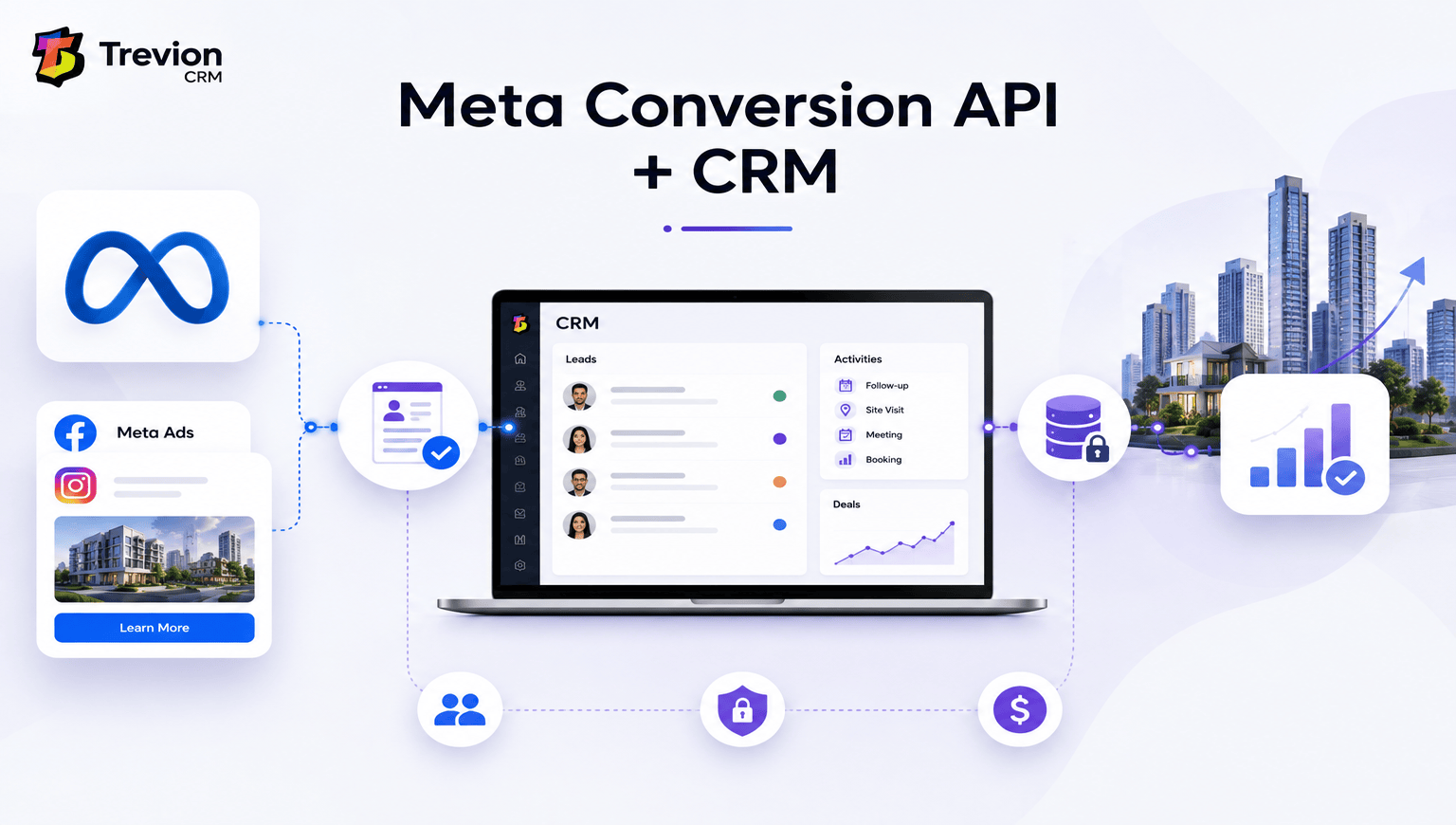
The basic flow looks like this:
Meta Ad → Lead → CRM → Sales Activity → Conversion Event → Meta
For example:
A customer sees your Meta Ad and fills out a form. ↓ The lead enters your CRM. ↓ Your sales team contacts the customer. ↓ The customer books a site visit. ↓ The CRM records the activity. ↓ Your integration sends the appropriate event to Meta.
This creates a connection between your marketing activity and your actual sales process.

Before starting, make sure you have the necessary Meta business and advertising assets, including your Meta business setup, ad account, and the relevant data source or pixel configuration.
The exact setup can vary depending on whether you're using a website, lead ads, CRM, server, or another integration method.
Don't send every piece of CRM data to Meta.
Start with the events that actually matter to your business.
For example, a real estate company might track:
The important thing is to decide which actions represent real progress toward a sale.
This is where your CRM becomes the middle point between your sales activity and Meta.
Depending on the CRM, the connection may be handled through:
If your CRM doesn't have a ready-made CAPI connection, a developer may need to build the integration using Meta's API requirements.
Your CRM may call an activity "Site Visit," while your Meta setup may use a different event name or custom event.
So the two systems need to be mapped correctly.
For example:
| CRM Activity | Meta Event |
|---|---|
| New Lead | Lead |
| Qualified Lead | Qualified Lead |
| Site Visit | Custom/appropriate conversion event |
| Booking | Custom/appropriate conversion event |
| Purchase | Purchase |
The exact event structure should be decided based on your campaign and implementation.
Your integration needs to send the appropriate event information to Meta.
Depending on the implementation, this can include information such as:
Customer data should be handled carefully and according to applicable privacy requirements.
Don't start running campaigns immediately after connecting everything.
First, check whether events are reaching Meta correctly.
Test the complete journey:
Ad → Lead → CRM → Sales Activity → Conversion → Meta
If an event isn't appearing correctly, check the CRM integration, event mapping, API setup, and data being sent.
Real estate sales don't happen instantly.
A person may click a Meta Ad today, speak with a salesperson next week, visit the property later, and book months afterward.
If you're only measuring the first lead, you may not know which campaigns are actually generating valuable customers.
A CRM gives your sales team the complete picture.
A dedicated Real Estate CRM can help organize leads, follow-ups, site visits, and sales activities in one place.
Once your CRM and Meta setup are connected properly, you can start looking beyond simple lead counts.
For example:
Campaign A: 500 leads → 20 site visits → 5 bookings
Campaign B: 300 leads → 35 site visits → 10 bookings
Campaign A generated more leads, but Campaign B generated more bookings.
That's the kind of difference that can change how you spend your advertising budget.
Only send the information and events required for your measurement and optimization needs.
A lead isn't always a customer. Where possible, measure meaningful steps further down the sales funnel.
If CRM activities aren't mapped correctly, your reports can become misleading.
Always test the integration before relying on the data for campaign decisions.
Customer information should be collected, stored, and shared responsibly and in accordance with applicable laws and platform requirements.
Yes, but the exact capability depends on the CRM and its integration options.
For builders and developers, a CRM for Builders and Real Estate Developers can bring lead management, follow-ups, site visits, project information, and sales activities into one system.
The important thing is not simply having an integration. The CRM should capture useful sales information that can eventually help you understand which marketing sources are producing real business results.
Connecting Meta Conversion API with your CRM can help close the gap between advertising and actual sales.
Instead of looking only at clicks and leads, businesses can start paying more attention to what happens after a lead enters the sales process.
For real estate companies, this is especially useful because the customer journey can involve several steps before a final booking.
The key is to start simple: identify your important conversion events, connect them correctly, test the data, and then use the information to improve your marketing decisions.
A good CRM software setup can make this process much easier by keeping your customer and sales activity organized in one place.
Meta Conversion API allows businesses to send conversion and event information from their server or systems to Meta, helping with measurement and campaign optimization.
Yes. Depending on the CRM, you may be able to use a native integration, API, automation platform, or custom development.
A CRM contains information about what happens after a lead is generated. Sending appropriate conversion events to Meta can help businesses understand which advertising activity is contributing to meaningful sales outcomes.
No. It can also be useful for businesses with longer sales cycles, including real estate, education, financial services, and other lead-generation businesses.

Tired of losing track of your leads? Automate follow-ups, capture inquiries instantly, and accelerate conversions with Trevion CRM.
Get the latest expert sales tips, workflows, and CRM insights to grow your business.